
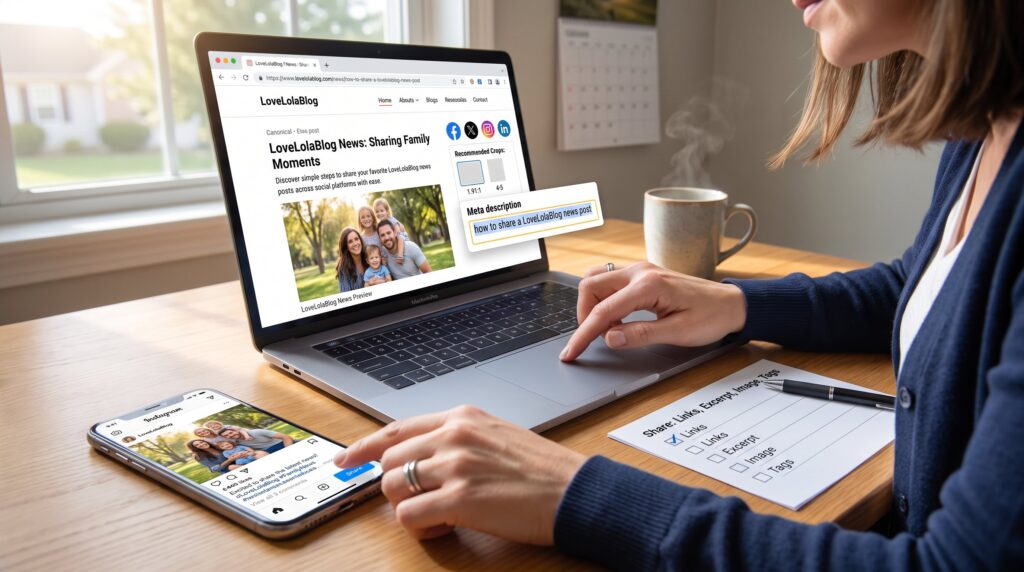
How to share a LoveLolaBlog news post starts with a clear link, a tight excerpt, and an image that invites a click. This guide explains when sharing matters, how to prepare a post for distribution, where to place comments and tags inside LoveLolaBlog, and which social networks amplify reach. It suits readers who want practical steps and editors who manage publishing. The instructions are concrete, platform-specific, and focused on real moments, publishing right after a breaking family or lifestyle update, or republishing an evergreen guide when seasonal interest spikes.
Key Takeaways
- Sharing a LoveLolaBlog news post effectively starts with using the canonical URL, a concise excerpt highlighting the post’s benefit, and a high-quality image formatted for each social platform.
- Prioritize sharing fresh, trending, or seasonally relevant posts within hours of publishing to maximize engagement and reach.
- Use internal tags, comments with clear prompts, and related links within LoveLolaBlog to boost discovery and foster community interaction.
- Tailor your social media shares to platform-specific norms: Facebook for benefits and calls to action, X for concise facts and hashtags, Instagram for visuals and captions, and LinkedIn for professional tone and tagging.
- Monitor engagement by tracking meaningful metrics like clicks, saves, and comments rather than just likes, and reply to early comments to encourage discussion.
- Avoid sharing unverified or draft content and always ensure image permissions to maintain trust and avoid backtracking.
Why Share LoveLolaBlog News Posts — Who Benefits And When To Share
Sharing a LoveLolaBlog news post delivers value fast: readers get timely family, lifestyle, wellness, travel, or home insights, and the site gains traffic and community engagement. Readers benefit when a post answers an immediate need, like a weekend recipe, a safety alert, or a short travel checklist. Editors and contributors benefit by expanding reach and tracking reader response.
When to share: prioritize posts that are fresh, trending, or seasonally relevant. For instance, a freshly published parenting piece the morning a local school issues a schedule change will attract attention: sharing within two hours often yields the best immediate engagement. Evergreen content, how-to guides or gift lists, performs well when repromoted before holidays or seasonal peaks.
Who should share: contributors, section editors, community moderators, and engaged readers who want to spread helpful information. Sharing also helps niche communities, parent groups, local travel pages, and home-improvement forums, where the post’s topic matches audience intent.
Practical warning: avoid sharing drafts or posts with unresolved fact checks. A mistaken claim shared widely creates backtracking work and erodes trust.
Prepare The Post For Sharing — Links, Excerpts, Images, And Permissions
Start with the canonical post URL and a concise excerpt that highlights the post’s specific benefit. The canonical URL prevents duplicate-tracking issues and is the link readers should click. Editors should copy the URL from the post’s address bar or the share button and confirm the canonical tag is set in the CMS.
Write a 1–2 sentence excerpt that states the concrete payoff: what problem the post solves and why now. Example: “A 5‑minute bedtime routine that cut one family’s sleepless nights by two weeks.” That kind of detail invites clicks.
Select one high-quality image used in the article: crop it to platform-preferred ratios (1.91:1 for Facebook link previews, 4:5 for Instagram feed). Use the image included with the post, do not reuse copyrighted media from elsewhere unless permissions are documented.
Check permissions and attribution. If the post quotes a source or uses a third-party photo, confirm any required credit appears in the caption. If the post includes a guest writer or sponsored content, follow the site’s disclosure policy. For practical next steps, the blog overview offers additional detail.
Link placement and supporting resources: add internal links that guide curious readers to related content. For example, pair the news post with a quick reference like the site’s guide to finding recent updates using an internal link to a relevant how‑to page such as the article on finding the latest updates. Use short anchor text that reads naturally in the sentence.
Editors should also prepare metadata: a short meta description (under 155 characters) that includes the phrase “how to share a LoveLolaBlog news post” once, and a meta title kept under 60 characters with the keyword near the start when natural. These small changes improve preview performance when the link is shared.
Share Inside LoveLolaBlog — Comments, Tags, And Internal Discovery
Post the excerpt and pose one clear prompt in the comments to spark discussion. State the takeaway first: “This post cuts laundry time by 30 minutes weekly for one family.” Then add context and invite readers to share their experience.
Use tags and related-article links to aid internal discovery. Add 3–5 accurate topic tags (family, home, quick tips) so site algorithms place the story on relevant listing pages. Link to archived content that explains the background: for example, pair the news item with navigation to the news archive by using a concise anchor phrase that fits the sentence naturally.
Subscribe and engage: encourage readers to follow the story thread and subscribe to the site newsletter or internal updates. Editors should open comments with a conversational, specific question, “Which two bedtime steps would you try tonight?”, to lower friction and increase replies.
Moderation notes and lessons learned: a durable tip from past posts is to reply to the first 10 comments within 24 hours: posts that receive early author replies saw higher subsequent engagement. Also, when a post includes time-sensitive corrections, update the post and add an edit note with a timestamp so internal readers trust the revision history.
Relevant internal resources: link to the site page explaining the blog’s social strategy to help contributors align messages. Use short anchor text inside a paragraph where it supports guidance on sharing and community growth.
Share On Social Media — Which Platforms To Prioritize And Why
Start by choosing platforms where the target audience already lives. For LoveLolaBlog lifestyle and family content, prioritize Instagram and Facebook for visual, community-driven posts, and X for timely updates and quick links. LinkedIn is useful for home‑tech or career-related guides.
Post timing matters: share family and lifestyle posts in the early evening (6–9pm local time) when parents scroll after dinner. For travel and weekend guides, post Thursday afternoon to catch planning behavior. Breaking news should be shared immediately, then updated later with a follow-up link if new facts emerge.
Cross-post smartly: adapt the message to platform tone. Keep the same canonical link across platforms to consolidate analytics. If a story benefits from repeated exposure, stagger shares across 24–72 hours rather than posting the exact same copy simultaneously.
Measure results: track clicks, saves, and comments, not just likes. A post that generates 150 saves and 30 comments usually delivers stronger long-term referral traffic than one with many passive likes.
Internal linking requirement: when sharing context about the blog’s recent activity, reference the site’s pillar updates by linking to a concise page that summarizes recent site posts. Place that link in a supporting paragraph so readers can explore the news hub.
Platform-Specific Tips And Optimal Formats (Facebook, X, Instagram, LinkedIn)
Facebook: Lead with the concrete benefit, then add the link and a preview image. Use a 1–2 sentence caption and a single call-to-action: “Read how this routine saved 3 hours/week.” Boost community posts in relevant groups using the same caption but remove direct promotional language.
X (Twitter): Put the key fact first in 1–2 lines. Add the link and 1–3 targeted hashtags (for example, #LovelolaLife or #LLBlogTips). Use a thread for quick follow-ups: initial headline, then two reply tweets that pull quotes or stats from the post.
Instagram: Use the image or a carousel of 2–3 slides that show the practical steps. Place the short excerpt in the caption and a clear prompt: “Tap the link in bio for the full routine.” For accounts with link stickers in Stories, add the article link and a 3‑second poll to increase engagement.
LinkedIn: Adapt tone to be slightly more formal. Lead with the problem and tangible outcome (e.g., “Cut household admin time by 20% with these systems”). Include the link and tag the author or the site’s profile for broader professional reach.
Formatting tips: always check and update the link preview before publishing. If the preview image looks cropped or the title is truncated, adjust the post’s Open Graph tags in the CMS so future shares display cleanly.
Practical warning: never post copyrighted images to social feeds without permission. Use the images already attached to the post or licensed stock that has documentation.
Conclusion
Sharing a LoveLolaBlog news post works best when the post is prepared carefully, canonical link, crisp excerpt, and an approved image, then amplified inside the site with tags and comments and on social channels using platform-specific formats. Editors who follow these steps will see steadier referral traffic, clearer reader engagement, and fewer correction cycles. For a central hub of recent items and announcements that supports sharing strategy, consult the site’s update page and align timing to audience behavior.